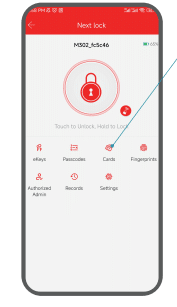
How To Add IC Card In App? Table of Contents How To Add IC Card In App? If you don’t know how to add an IC card, you can follow the steps below. Applies to: Smonet Smart Deadbolt Door Lock Step 1: Tap "Cards". Step 2: Add card. Step 3: Enter a name for the card. Step 4: Place the card at the designated spot of the keypad when the lock says "Please swipe your card". Step 5: Input successful.
How To Tell If A Smart Lock Is A Left Or Right Door Opener? A1 Smart Locks, Installation, M1 Smart Locks, Setup, Y1 Smart Locks
How Do I Test If A Door Lock Has Been Successfully Installed? Y1 Smart Locks, A1 Smart Locks, Installation, M1 Smart Locks, Setup
How To Create An Account As Well As Pairing In Smart Door Lock App? A1 Smart Locks, Bluetooth Door Lock, M1 Smart Locks, Software, Y1 Smart Locks
How To Find And Change The Admin Passcode? A1 Smart Locks, Bluetooth Door Lock, M1 Smart Locks, Password, Software, Y1 Smart Locks